Cloud security posture management: Risks, controls and compliance

Cloud risk often begins with a configuration gap, not a sophisticated attack. Cloud security posture management (CSPM) helps organizations find and prioritize those gaps by continuously assessing cloud configurations, permissions and security settings against risk and compliance requirements. Gartner coined the term in 2014, and the core purpose remains practical: make cloud risks visible before they become harder to manage.
It’s reasonable to expect a security tool to flag issues and make the next step clear. Cloud security posture management (CSPM) surfaces findings, but its value depends on distinguishing urgent exposures from lower-priority concerns and supporting effective remediation.
This article explains what CSPM does, how it detects and contextualizes cloud risks, and how its features support remediation and compliance. You’ll learn how continuous visibility, risk prioritization, and audit reporting fit into a broader cloud security approach, helping you assess how CSPM can strengthen your organization’s controls.
Table of Contents
What is cloud security posture management (CSPM)?
CSPM helps teams find weaknesses in cloud infrastructure by assessing configurations, assets, and permissions. Its value comes from identifying exposures across changing environments and directing attention to practical corrective action.
CSPM Definition and Purpose
CSPM is an approach that continuously assesses cloud configurations for security risks and compliance gaps. Gartner coined the term Cloud Security Posture Management in 2014. For example, an exposed storage asset or an overly broad permission can increase risk even when other controls are working. By presenting these issues together, CSPM helps security teams understand where cloud posture needs attention.
CSPM Compared With Other Cloud Security Solutions
CSPM focuses on configuration risks across cloud infrastructure, while other security solutions may focus on workloads, identities, or network traffic. Cloud-native controls can assess resources within one provider’s environment, while broader platforms can provide visibility across different environments. Compare tools by the cloud assets and integrations they cover, the context they provide for risks, and how they support remediation. Organizations often distinguish foundational posture management capabilities from advanced threat protection plans, so compare the specific capabilities relevant to your environment. No single product category replaces every cloud security control.
CSPM for Changing Workloads and Infrastructure as Code
CSPM can assess serverless resources and ephemeral workloads that appear and disappear as applications run. It can also examine infrastructure as code before deployment, helping teams spot risky settings in planned resources. For example, a review can flag an overly permissive configuration before it becomes part of live infrastructure. Implementation typically involves connecting cloud accounts, defining asset scope and security standards, prioritizing findings, assigning remediation, and reviewing changes. This process integrates deployment practices with ongoing posture monitoring instead of relying only on checks after an asset is live.
CSPM detection, risk contextualization, and remediation
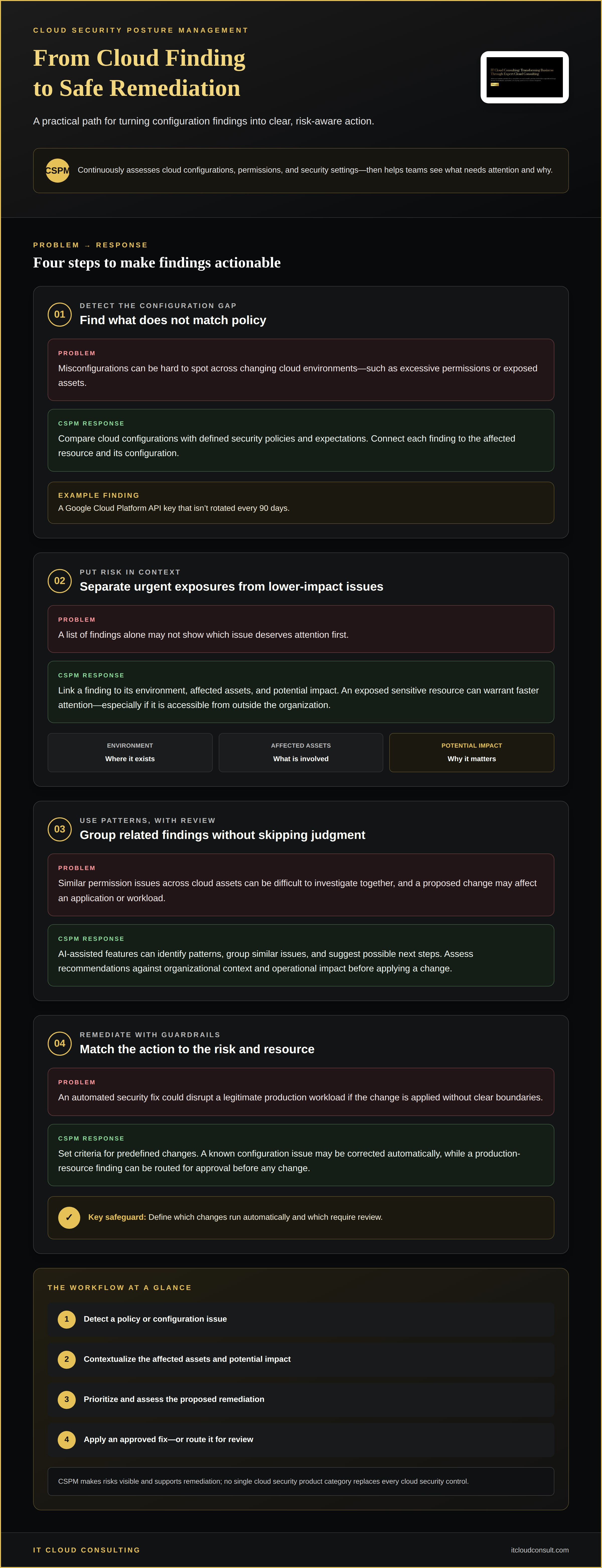
CSPM detects cloud risks by comparing configurations with security policies and surfacing findings for review. A Google Cloud Platform API key that isn’t rotated every 90 days is one example of a configuration issue.
Risk Contextualization and Prioritization
Risk contextualization links a finding to its environment, affected assets, and potential impact. This helps teams distinguish an exposed sensitive resource from a lower-impact configuration issue. For example, a data-security misconfiguration may need faster attention if the affected asset is accessible from outside the organization. CSPM findings are more actionable when they explain the risk and help teams decide what to remediate first.
Misconfiguration Detection
CSPM detects misconfigurations by checking cloud environments against defined security policies and configuration expectations. It can identify excessive permissions, exposed assets, or issues such as Google Cloud Platform API key rotation. A useful detection workflow connects each finding to the affected resource and its configuration, so teams can see what needs attention. Reviewing findings in the context of the environment’s architecture helps reduce noise and focus remediation on relevant exposures.
AI-assisted features can identify patterns across findings and suggest possible next steps. For example, a system might group similar permission issues across cloud assets so analysts can investigate related configurations together. Recommendations still need to fit the organization’s context: changing a permission can affect a workload or application. Assess the proposed change and its operational impact before applying it.
Automated Cloud Risk Remediation
Automated remediation applies a predefined change when a finding meets the organization’s criteria. A workflow might correct a known configuration issue or route a finding for approval before changing a production resource. Automation can shorten the path from detection to action, but teams need clear boundaries for which changes run automatically and which require review. This helps prevent a security fix from disrupting a legitimate workload.
For organizations refining how they manage cloud configurations, Cloud Optimization can support a more deliberate approach to remediation and ongoing risk reduction.
Compliance frameworks including CIS, GDPR, HIPAA, ISO 27027, PCI-DSS, and SOC 2
CSPM can map cloud configurations to established standards, helping organizations assess compliance and identify gaps. It can continuously compare settings across platforms with CIS benchmarks, NIST guidance, PCI DSS and SOC 2 criteria. This creates visibility into where controls align and where remediation may be needed, but a configuration assessment alone doesn’t establish full compliance.
Framework coverage can include the General Data Protection Regulation (GDPR), ISO 27001, the Payment Card Industry Data Security Standard (PCI DSS), and HIPAA. HIPAA was enacted in 1996 as a U.S. federal law establishing national standards to protect medical records and individually identifiable health information. CSPM can monitor cloud configurations against HIPAA requirements, while helping teams organize evidence relevant to their broader compliance work.
NIST offers standards that can inform cloud security assessments. NIST SP 800-171 is a publication that nonfederal computer systems must follow when storing, processing, or transmitting controlled unclassified information. A CSPM assessment can map relevant cloud assets and configurations to standards such as NIST, CIS, PCI DSS and SOC 2. This helps teams identify control gaps, track changes and prepare reporting for audits.
Multicloud and hybrid-cloud environments can make consistent monitoring more complex. Estimates cited in the market put multicloud adoption at 87% of organizations and hybrid-cloud use at 72%, increasing the range of platforms and configurations security teams may need to assess. Disparate settings can create blind spots, including an overlooked container configuration or a control applied on one platform but missed on another. Continuous monitoring helps surface changes and potential threats as cloud environments evolve, rather than relying only on periodic snapshots. Teams can then investigate findings, prioritize remediation and maintain clearer records of their compliance posture.
Cloud security posture management features
A CSPM tool should turn cloud configuration data into useful security insight. Core capabilities include asset visibility, policy assessment, risk context, and finding tracking. Together, these features help teams understand whether an issue affects a production workload, a development environment, or a control relevant to an audit.
Visibility depends on how often the tool refreshes its view. Current CSPM tools may provide updates within minutes or seconds, while traditional snapshot tools may refresh once or twice a day. Faster updates can help teams spot configuration changes sooner, especially when cloud workloads change frequently. Coverage matters too: an asset inventory should show which environments and resources the assessment includes.
Useful capabilities often include:
Configuration assessment: compare cloud settings with selected security benchmarks and identify deviations.
Risk context: connect a finding to its affected asset, workload, and potential exposure.
Remediation tracking: show whether teams have addressed a finding or still need to act.
Reporting: organize findings and status information to support audits.
Integration determines how well CSPM features fit into existing security operations. A tool that brings cloud findings into established workflows can help teams review alerts alongside other relevant information. Before prioritizing capabilities, map the cloud platforms, workloads, and reporting needs the tool must cover. For instance, a team managing several environments may value consistent asset visibility and clear reporting more than a long list of disconnected features.
Choose features around the decisions your team needs to make, not dashboard volume alone. If you’re aligning cloud operations with security priorities, plan your cloud optimization.
IT Cloud Consulting
IT Cloud Consulting helps organizations connect cloud security priorities with their broader cloud strategy. If CSPM findings reveal recurring configuration gaps, unclear ownership, or challenges across environments, strategic guidance can help shape a practical path forward. Strategic Cloud Adoption supports planning for cloud initiatives, while Cloud Optimization helps align existing environments with operational and security priorities. Ongoing Cloud Support provides continued assistance as cloud needs evolve.
This support is useful when teams need to turn assessment findings into a broader cloud plan, improve how environments are managed, or sustain progress over time. The right focus depends on your cloud setup, current priorities, and the work needed to address identified risks. Contact IT Cloud Consulting to discuss your cloud security priorities.
Make Cloud Security Part of Every Change
Cloud security posture management is most effective when it becomes part of how an organization plans, operates, and evolves its cloud environment. The next step is to connect security priorities with decisions about cloud architecture, team responsibilities, and day-to-day operations. This alignment helps teams make cloud security an ongoing business capability rather than a separate technical task.
Start by identifying the outcomes your organization needs from its cloud strategy, then consider how security practices can support them as environments change. Clear ownership and shared direction help teams turn findings into deliberate improvements while keeping cloud initiatives moving forward.
IT Cloud Consulting can help you consider how cloud strategy and operations align with your security priorities. Contact IT Cloud Consulting about CSPM to discuss a practical next step for your organization.
Frequently Asked Questions
What is CSPM?
CSPM, or cloud security posture management, helps organizations assess whether cloud resources meet their security expectations. It focuses on the state of cloud resources, rather than replacing identity protection or threat investigation. For example, teams can use CSPM findings to identify which resource owner should review a configuration and whether the issue affects a development or production environment.
Can CSPM detect active threats or just misconfigurations?
CSPM primarily identifies risky configurations and exposures; it is not a complete active-threat detection system. A public-facing resource with unexpected permissions may indicate a path an attacker could exploit, but it doesn’t prove an attack is underway. Security teams can use CSPM findings alongside threat-monitoring processes to investigate activity and determine whether a configuration issue needs urgent attention.
How does CSPM handle serverless and ephemeral workloads?
CSPM can assess serverless functions and short-lived workloads by evaluating their cloud configurations while they exist. For a function created during an application release, useful checks may include its access permissions and connections to other resources. Because ephemeral assets can disappear quickly, linking findings to deployment records or ownership helps teams identify which change created the resource and where to address the underlying issue.
How does CSPM integrate with infrastructure as code?
CSPM can complement infrastructure-as-code workflows by assessing planned configurations before deployment and comparing them with live cloud settings. For example, a template that grants broader access than intended can be flagged during review, while a later assessment can reveal whether deployed resources have drifted from that template. This connection helps teams address security concerns in development, not only after resources reach production.
How quickly can a CSPM solution be deployed?
Deployment timing depends on the environment’s scope, access setup, cloud platforms, and integrations. Connecting a limited set of accounts requires different preparation from establishing consistent policies across several environments and routing findings into existing workflows. Teams also need to define which assets are in scope and who will review findings. These decisions shape the rollout and establish a practical implementation sequence.
What are common CSPM tooling capabilities?
Common CSPM capabilities include cloud asset inventory, configuration assessment, policy mapping, finding prioritization, and audit reporting. Some tools also connect findings with deployment workflows or other security systems. For example, a team can use ownership details to route an exposed-resource finding to the group responsible for its application. Compare capabilities against specific operational needs, not feature counts alone.
Comments